Clean your listbefore youhit send.
Go WebMonth asks every mail server directly, from your own PC, whether the inbox exists. No per-email fees — pay once.
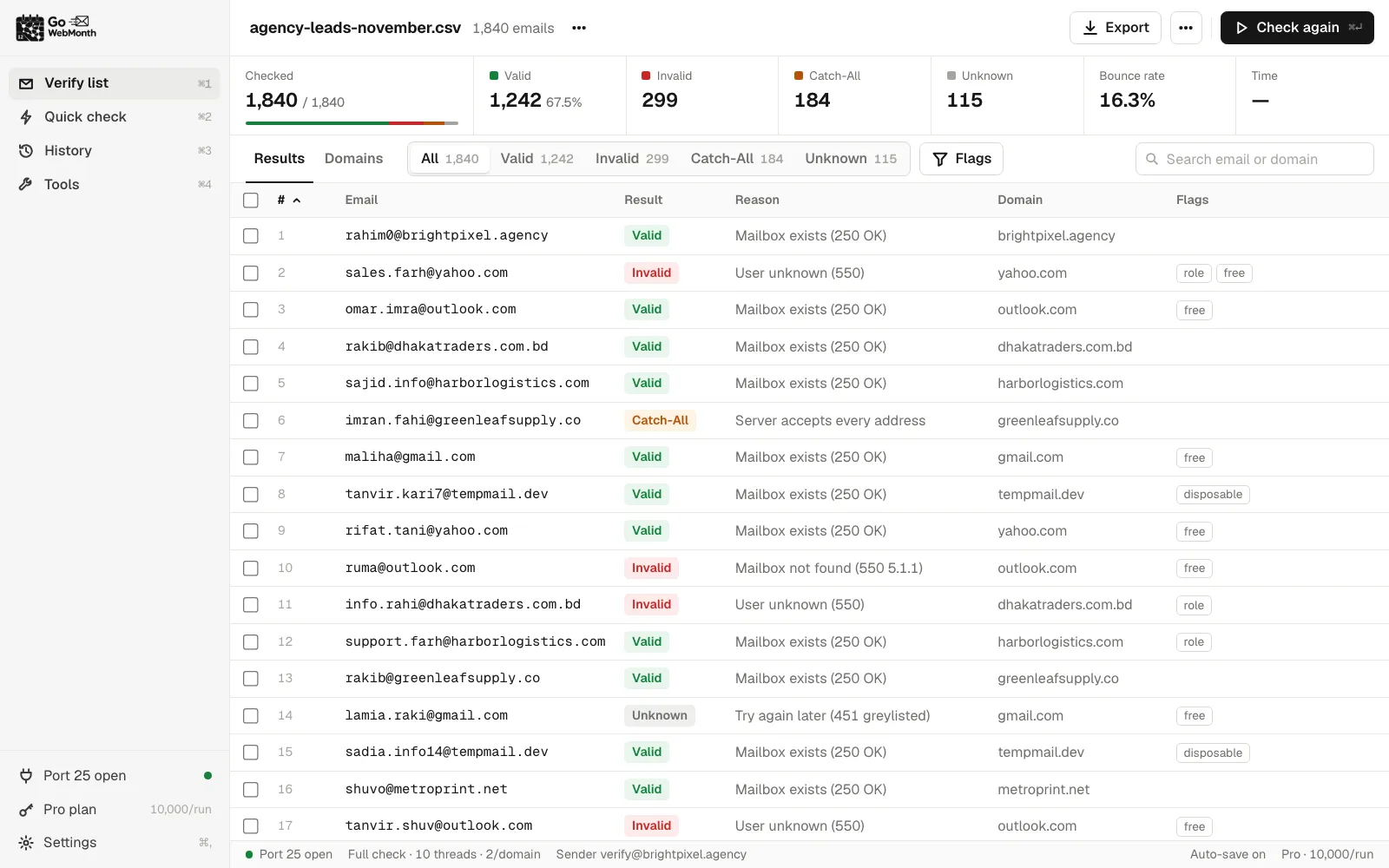
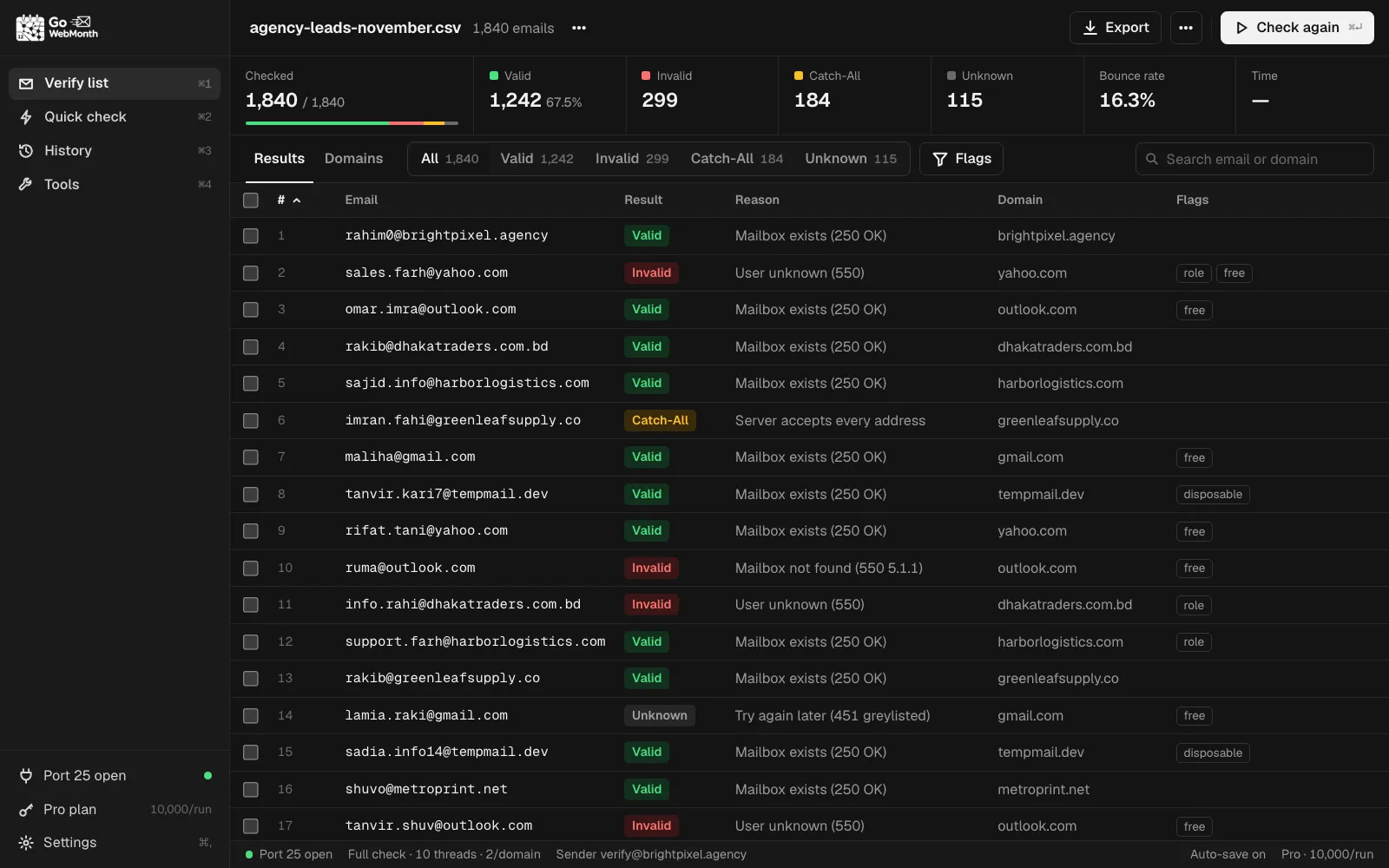
Built for lead-gen freelancers and agencies in Bangladesh
Online verifiers charge for every email because the checks run on their servers. Go WebMonth does the same job with your PC and your internet — so there's no per-email cost, and no limit on runs.
Why do others charge for every email?
Online verifiers run the checks on their own servers. The cost of those servers, IPs and bandwidth is billed to you, email by email. Go WebMonth does the same job with your PC and your internet — so there's no per-email cost.
Online verifiers
- ✕Usually ৳4,500 – ৳12,000 per 10,000 checks
- ✕You pay again every time
- ✕Your whole list is uploaded to their server
Go WebMonth
- One payment: ৳870 or ৳1,270
- Unlimited runs, for life
- Your list never leaves your PC
Checking 10,000 emails every month for a year
At least ৳54,000 with online verifiers
৳1,270 once with Go WebMonth Pro
Based on the published prices of popular online verifiers ($37–$99 per 10,000 checks, $1 = ৳122). Prices change over time.
One app for the whole job.
Import
Drop in CSV or TXT. The email column is found and duplicates removed.
Three-level check
Format, mail server, then mailbox — without sending a single email.
Catch-all detection
Servers that accept every address are shown separately, never guessed.
Live stats
Valid, Invalid, Catch-All and bounce % — live while it runs.
Connection check
Know before you start whether port 25 and DNS are working.
One-click export
Valid only, or Valid + Catch-All — straight to CSV.
No middleman server — it asks the inbox directly.
First it checks that the domain exists, then the mail server, then the mailbox — and stops right before any email is sent. Every check runs from your PC; your list is never uploaded.
No. It only asks the mail server whether the address exists and stops before any message is sent.
A clean list in four steps
- 1
Import your list
Drop in a CSV or TXT file. The email column is found automatically and duplicates removed.
- 2
Three-level check
Format → the domain's mail server → whether the mailbox exists. No email is ever sent.
- 3
See the results
Valid, Invalid, Catch-All, Unknown — each with a plain reason.
- 4
Export
Valid only, or Valid + Catch-All — save a CSV in one click.
What each result means
No verifier can be 100% certain — especially on catch-all domains. So we show what we know and never guess.
Read the FAQThe mail server confirmed the mailbox exists. Safe to send.
Bad format, no mail server, or the mailbox doesn't exist. Remove it.
The server accepts any address, so it can't be confirmed. Send with care.
The server said try later or didn't answer. Check again later.
Pay once. Use it for life.
Both plans include every feature. The only difference is how many emails one run can check.
Starter
For small lists and getting started
- Unlimited runs
- 1 PC (can be moved later)
- All features and free updates
- bKash payment, license in seconds · email support
Pro
Most popularFor lead-gen freelancers and agencies
- Unlimited runs
- 1 PC (can be moved later)
- All features and free updates
- bKash payment, license in seconds · email support
Start with Starter — upgrade to Pro any time for ৳470. Nothing you paid is lost.
Requirements
- Windows 10 or 11 (64-bit)
- Internet with port 25 open — most broadband has it, some mobile data blocks it
- Test before you buy, in PowerShell: Test-NetConnection gmail-smtp-in.l.google.com -Port 25
Common questions
No — and be careful with anyone who claims that. Servers that accept every address (catch-all) or block checks can't be confirmed by any verifier. We show those separately.
Send Money with bKash and enter the TrxID. Once it matches, you get your license key, the download link and an account in seconds — all emailed to you too.
Each time you press Start, Starter checks up to 2,000 emails and Pro up to 10,000. You can run as many times as you like.
It works on most home and office connections. Run the PowerShell test above before you buy; the app's Connection check also tests port 25.
Yes. Press Deactivate in the app on the old PC, or remove the old PC from your account page. You can move it up to 3 times a month.
No. It only asks the mail server whether the address exists and stops before any message is sent.
Windows only for now. A Mac version may come later.
Upgrade from Starter to Pro for just ৳470 in your account — the key stays the same. Support is by email on both plans: gosupport@webmonth.com.
Clean the list.
Send with confidence.
Pay by bKash and get your license key in seconds.